I suffer from having too many open tabs.
I think I should start dumping links into webpages like these and begin trying to treat my computers more like the desktops of old. People used to shut down their systems entirely after every use. I have a friend who actually still does this with his very modern laptop.
Sleep modes and desktop restoration on my daily driver operating systems has allowed me to enter into a state of rot with respect to the number of open tabs I have.
By forcing myself to go through them and take action, I should in theory be able to have more focus and intention when I approach my computer.
I think one of my problems now is that there is so much I could do, it's hard to pick the right thing at any given time and so often enough I just end up doing nothing at all.
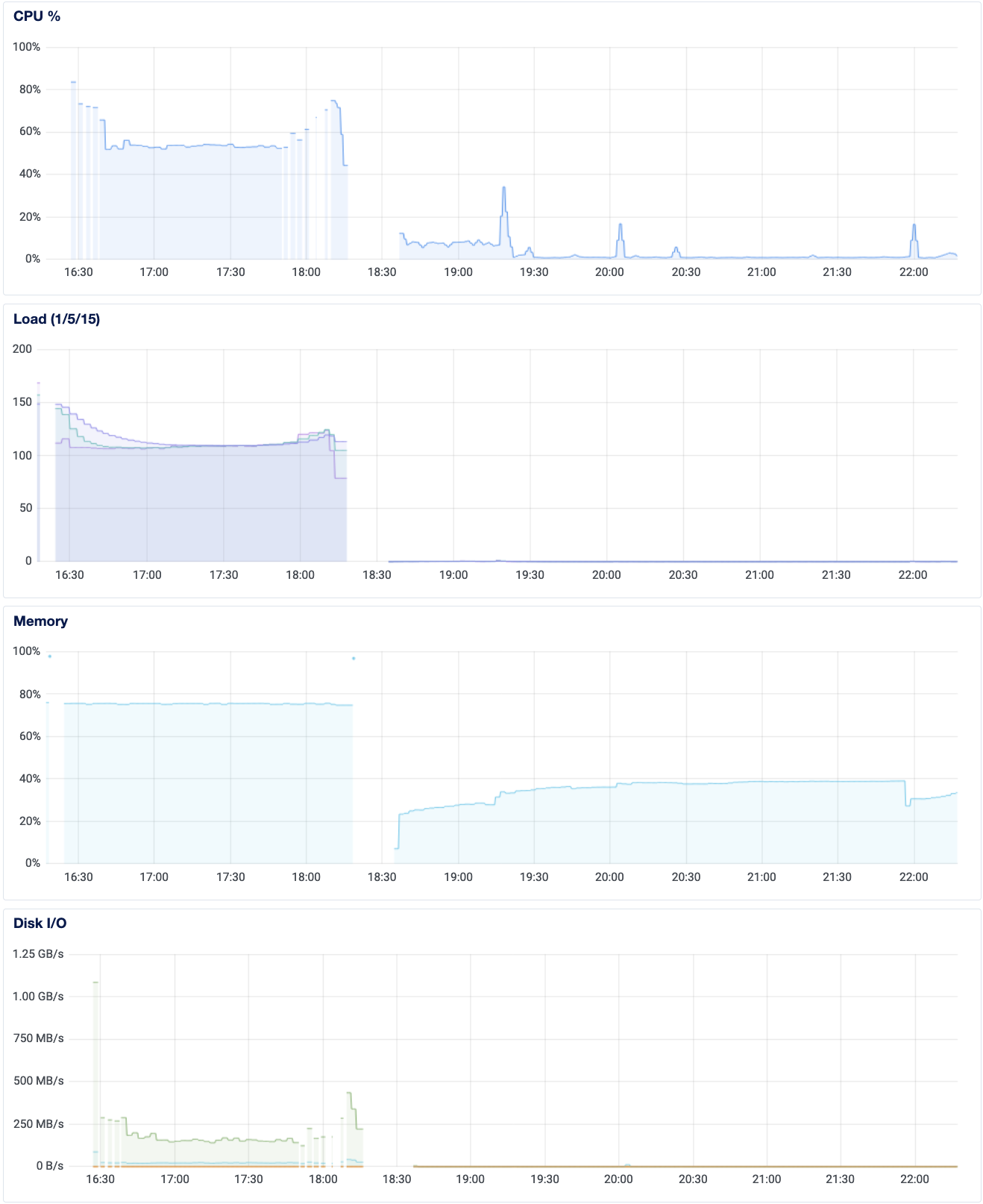
I tried to access one of my server pages only to find it completely unresponsive.
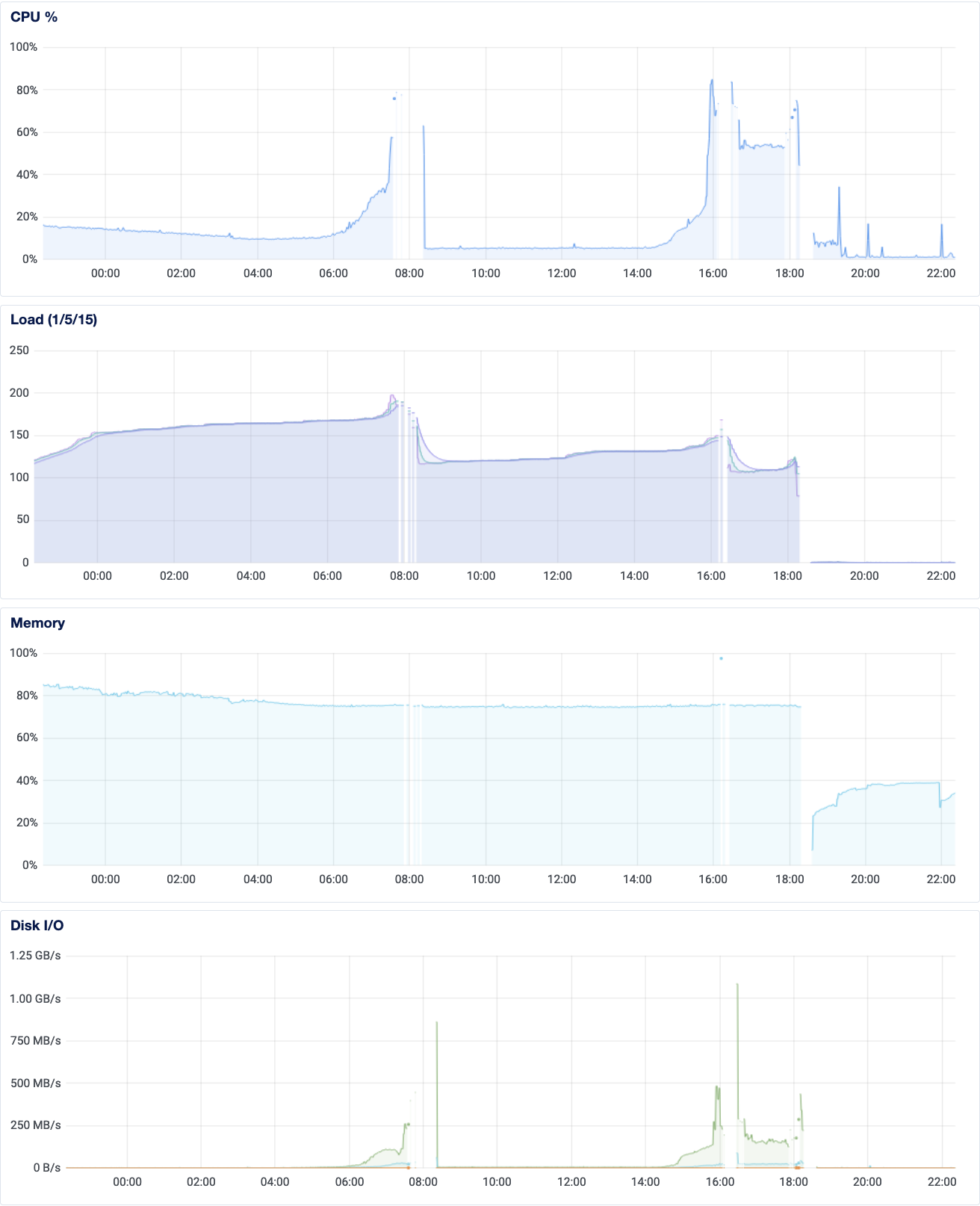
I cannot tell what caused a dramatic spike in load starting early this morning.
It was gradual but substantial.
I was unable to run commands as basic as docker ps, something was locking up the computer.
I am unsure of the root cause (perhaps it was NFS, that's the hypothesis), but what follows are the things I encountered in restoring service.
For reference, my services on this server are:
littlelink servers (testing) serving up links to my socials / projectsapache2 file-server for files I want to access from anywhere, sort of the start of a "global directory for Michael" but really for now just a convenient way to share things with friends.jupyterhub so that I can access compute from anywhere (minimal resources but enough for basic data processing), and so that my friend can have a stable python environment for occasional work-automation tasks (a recent development but this sort of use-case is what I originally deployed this for)photoprism mounted on s3fs-mounted DigitalOcean buckets. Need to migrate this to locally hosted at home.mariadb for photoprismpostgres for jupyterhubgitea (git.mlden.com) for public-facing github stuffmailserver (mlden.com, clfx.cc) email server, which I would very much like to secure through Cloudflare eventually as well.Of these, nginx, littlelink(s) and apache2 failed to restart, and photoprism was inaccessible because I forgot to migrate it to Cloudflare after my recent clfx.cc DNS changes.
The littlelink servers had an unless-stopped restart policy, so I'm not sure why they didn't come back up, but I manually re-started them.
I thought about changing the policy to always but I want to see if they come back up on their own the next time I restart docker (they did, hopefully on reboot they will too).
It may have been the NFS server I configured at fault, with DNS issues at home leading to failing autossh tunnel connections outbound to register the NFS drive at home as a local one for the server.
I managed to reboot the server using the DigitalOcean console but then it failed to turn back on.
What happened was the /etc/fstab file was trying and failing to mount the NFS drive (despite the line being commented out with a #), so I had to boot from a recovery ISO, edit the file by adding another # character in front of the NFS-related line, and then was able to boot from the hard drive and start diagnosing my server.
The restart was very bad though, as many services did not come back alive properly (most, including the most important one... nginx).
But at least I had a responsive shell, working ssh access from my laptop, and docker ps was working again.
Soon enough I was able to diagnose the problem of unfinished re-configuration of some of my services being migrated to Cloudflare.
I left things in an incomplete state and as a result nginx failed to restart.
I registered px.clfx.cc and files.clfx.cc, pointed them to the new IP addresses, and brought those services back online through Cloudflare.
I ended up using the docker-supplied IP address with docker inspect <container_name> | grep IPAdd in the configuration and pointing to the internal container ports, despite binding to external ports as well (I was debugging).
However, in trying to bring up my apache web-server on 8080 (to bind to localhost:8080 in Cloudflare), I found another unexpected bug...
For some reason port 8080 was suddenly occupied when I expected it to be free as well.
I got this error:
ERROR: for webserver Cannot start service server: driver failed programming external connectivity on endpoint webserver (<container_id>): Bind for 0.0.0.0:8080 failed: port is already allocated
Running doas netstat -tulpn | grep 8080 yielded nothing.
I also tried this:
mm@cloud:~/apache-server$ doas ss -lptn 'sport = :80'
doas (mm@cloud) password:
State               Recv-Q              Send-Q                           Local Address:Port                           Peer Address:Port              Process
LISTEN              0                   4096                                   0.0.0.0:80                                  0.0.0.0:*                  users:(("docker-proxy",pid=33534,fd=4))
LISTEN              0                   4096                                      [::]:80                                     [::]:*                  users:(("docker-proxy",pid=33540,fd=4))
mm@cloud:~/apache-server$ doas ss -lptn 'sport = :8080'
doas (mm@cloud) password:
State                  Recv-Q                  Send-Q                                   Local Address:Port                                     Peer Address:Port                  Process
I also found pip install whatportis which has "common usage" of the ports.
Neat but not helpful.
The mystery persists...
< some time later >
Since I could not find a service running on the port, I figured it couldn't hurt to try seeing what was running.
curl localhost:8080 led to a "Connection Refused" message, but curl localhost:80 showed me my expected homepage.
That gives me a hypothesis: perhaps nginx is installed on the system and upon failing to start on port 80 due to a docker container binding to that port, nginx defaulted to 8080 instead as an alternative default HTTP port.
curl localhost:<other port> also shows "Connection Refused", and nginx and apache2 are not installed on the computer.
I got tired of trying to start apache2 via docker-compose.yml and changed my debugging strategy:
docker run --rm -ti -p 8080:8080 python:3.9 python -m http.server 8080
And that worked... So my problem with the apache2 container must be something else.
The bind I am using is 8080:80 from the docker-compose file.
I tried my debugging command for the same network with the --network=file-server flag.
I don't know what worked but suddenly I could bind to 8080 again... At some point I did restart docker and did try to kill processes in htop that were found by filtering for the port number.
I wish I thought of the better debugging step earlier but oh well, everything seems to be working now.
I made sure the webserver (apache2) service would not have a restart policy.
I still want to go through logs to figure out what was bogging down the server, checking on the DigitalOcean dashboard reveals that things are looking okay now.
One thing I did disable was the rsync job from my laptop to the server.
I want to keep that disabled and sync journal entries manually for the time being while keeping an eye on how the droplet continues to perform.
Some to-do's
- set up overleaf on home server
- migrate photoprism to home server
- set up Cloudflare access via nginx (with htpasswd -c .htpasswd <username> to create and -v to verify)
- have nginx direct to local services
- do the above for the services in mlden.com after migrating DNS to Cloudflare.
In looking at my log files from gitea (referenced below), I found that fenics and super stopped syncing because of expired github tokens.
Later that day I updated the page with the new token I generated (I was reminded when I came across the still-open Github tab in trying to clean up my browser at the end of the evening).
If I recall correctly, I have been keeping logs on server access attempts on my io server for quite some time.
I should save this data and do some analysis on it to see if the migration to Cloudflare has resulted in a change in attacks.
Unfortunately since the server restarted recently, I am not sure I actually have the history of attempts or not.
docker logs gitea reveals that time-stamps are incomplete for SSH attempts.
The fact that time-stamps show up for some interactions means that I can at least get an inconsistent time series observation, with data going back to 2022-05-06. I captured the log today and hosted it on my server here
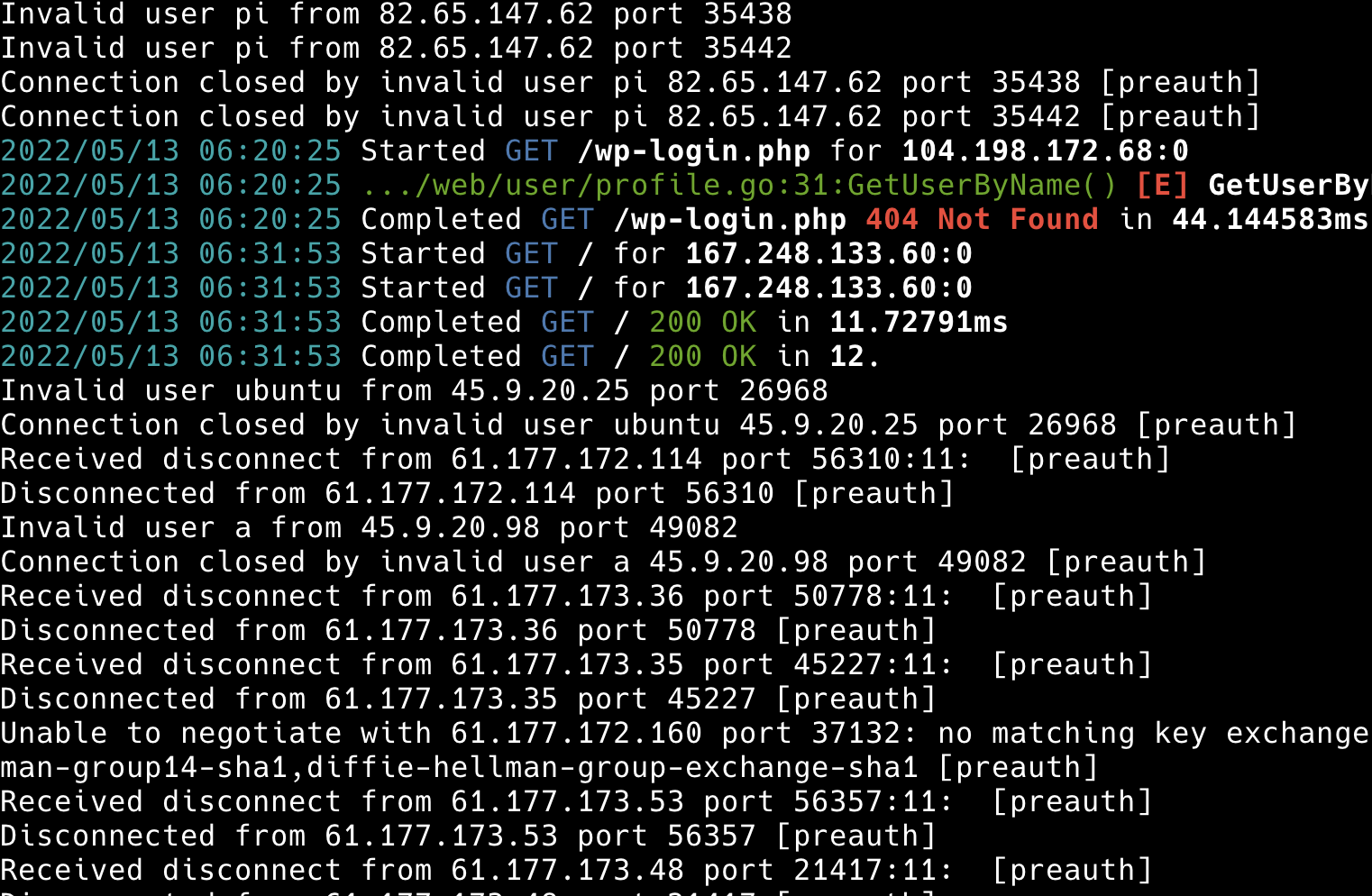
I can see that I do have daily data (at least one observation per day) for the two week period by looking at the parse of
cat .gitea-05-20.log | grep 2022/05/ | awk '{ print $1 }'
I do observe attacks as recent as yesterday, so perhaps I need to close port 22 in my router configuration (apparently I already did, though I forgot to close my secondary SSH port which was rendered useless anyway). That reminds me that I now will not be able to access my studio server without a VPN or memorizing its IP address and re-opening the other SSH port (it is probably better to leave it closed to the world entirely).
If my studio server's IP address is no longer in DNS records, how is it that I can still receive attacks?
On my cloud server I have logs going back three months earlier and have not yet migrated that to Cloudflare. I went ahead and saved this file and uploaded it to here.
I can definitely develop the code on the smaller dataset and then apply it to my cloud server, and if I make the change on June 2, I would have exactly four months of data prior to the changepoint of switching to Cloudflare.
I loved my first experiments with pyscript (mud research), but didn't get around to handling interactions between the DOM and Python. I finally looked it up and have saved an example from this stack overflow post along with an interactive todo list which relies on a python file to embed the code into more deeply nested HTML than the basic example I put together (also looks like styling is possible!).